PDF or DOCX · up to 2MB
How to take a professional headshot at home with your phone: the lens, the light, the distance and the crop, plus when an AI headshot does a better job.
Your LinkedIn About holds 2,600 characters, but desktop shows about four lines before "see more". Where LinkedIn folds each section, and what to put first.
A LinkedIn profile review to run before you apply, in the order a recruiter reads you, plus a free checker that shows what holds you back in search.
The right LinkedIn profile picture size (400 x 400 pixels or more, under 8MB), how to frame it for the circle crop, and what recruiters notice first.
You can take a professional headshot with your phone in about twenty minutes. Use the back camera on its 2x or 3x lens, stand a couple of metres away, face a large window, put a plain wall well behind you, and take a lot of frames. Then crop to head and shoulders. That's most of what a photographer would do for you, minus the invoice.
If you're still deciding what the finished photo should look like, our guide to the LinkedIn profile picture covers the size, framing and background LinkedIn needs. This post is about getting that photo out of your phone. For the rest of the profile, the LinkedIn profile guide covers your headline, About section and settings.
A ring light, backdrop or reflector would help, but window light does the job for free.
The front-facing camera is the main reason selfie headshots look like selfies. It's usually lower quality than the back camera, and because it's wide-angle and held at arm's length, it distorts your face: the nose looks bigger, the ears smaller, the face rounder.
Switch to the back camera and pick the 2x or 3x lens if your phone has one. A longer lens means you stand further away, and standing further away flattens your features into the proportions people see when they talk to you. Photographers use roughly the same idea with an 85mm portrait lens for exactly this reason.
If your phone only has a wide lens, resist stepping closer to fill the frame. Stay about a metre and a half away and crop afterwards. You lose some resolution, but LinkedIn only needs a 400 x 400 pixel photo, so there's plenty to spare.
Light makes more difference to a headshot than the camera, the outfit or the background.
Face a window. Stand two to three metres back from a large window, facing it, so daylight falls evenly across your face. The camera goes between you and the window, a little to one side so it doesn't block the light. Then turn so one shoulder points slightly towards the window, around 30 degrees. That gives your face some shape without one side going dark.
Avoid these:
If you're outdoors, open shade (under a tree, beside a building, on the shady side of a street) gives the same soft light as a window.
Glasses tip: if you see reflections in your lenses, turn a little further from the window, or lift the arms of your glasses a few millimetres off your ears so the lenses tilt down.
Pick a plain, light or mid-grey wall if you have one. A clean white wall works too, though it can look a little stark.
The important part is distance. Stand at least a metre or two in front of the wall, not against it. That stops your shadow landing on the wall behind you, and it lets the background fall slightly out of focus, which looks more like a studio photo.
If you don't have a plain wall, a tidy room works when the background is far enough behind you to blur. Check the edges of the frame for plants growing out of your head, door frames cutting through your shoulders, and anything with writing on it.
Portrait mode can help blur a busy background. Check the result closely, though: portrait mode often struggles with the outline of hair, glasses and ears, and leaves a smudgy halo around them. If it looks wrong when you zoom in, turn portrait mode off and rely on distance instead.
Put the phone at eye level or very slightly above. A camera below your chin looks up your nose and makes you look like you're being photographed by a child. A camera far above looks down at you and shrinks your body.
Put the camera about one and a half to two metres from you, using the 2x lens. Frame from mid-chest up, with some space around you. You'll crop tighter later, and having room makes it easier to straighten and centre the shot.
Use a tripod, a shelf or a stack of books. Holding the phone at arm's length brings back every problem from Step 1.
Take more frames than feels sensible. Professional photographers take dozens to get one keeper. Use your phone's burst mode or a timer with several shots (most phones can take a run of photos on a 3 or 10 second timer), change your expression slightly between each, and pick the best later.
Dress one notch above what you'd wear on a normal day in the job you want.
If you wear glasses every day, wear them in the photo. People should recognise you when you meet.
Pick your best two or three shots on a big screen, not on the phone. Look at the eyes first: they should be sharp. A slightly better expression doesn't make up for soft focus on the eyes.
Then make only these edits:
Skip beauty filters, skin smoothing and face-reshaping tools. They're the fastest way to make a real photo look fake, and they make the first video call awkward. A small spot removal is fine.
Export as a JPG at 800 to 1,200 pixels square. That's comfortably above LinkedIn's 400 pixel minimum and well under its 8MB file limit.
| Check | Good sign |
|---|---|
| Lens | Back camera, 2x or 3x |
| Distance | 1.5 to 2 metres from the camera |
| Light | Facing a window or in open shade, no overhead light |
| Background | Plain, a metre or more behind you |
| Camera height | Eye level or slightly above |
| Focus | Eyes are sharp |
| Crop | Square, head and shoulders, face about 60% of the frame |
| Edits | Crop, brightness, contrast, nothing that changes your face |
Some situations are hard to fix with a reshoot:
In those cases, an AI headshot built from a real photo of you is a reasonable shortcut. Our free AI headshot generator takes one clear photo of you and returns a 1024 pixel square headshot. It's built to keep your face, hair, skin tone and glasses, while you choose the background (light, dark, office or outdoors) and either keep your own clothes or switch to smart casual or a suit. It's free once a day with no account, and the photo you upload is used once and not kept.
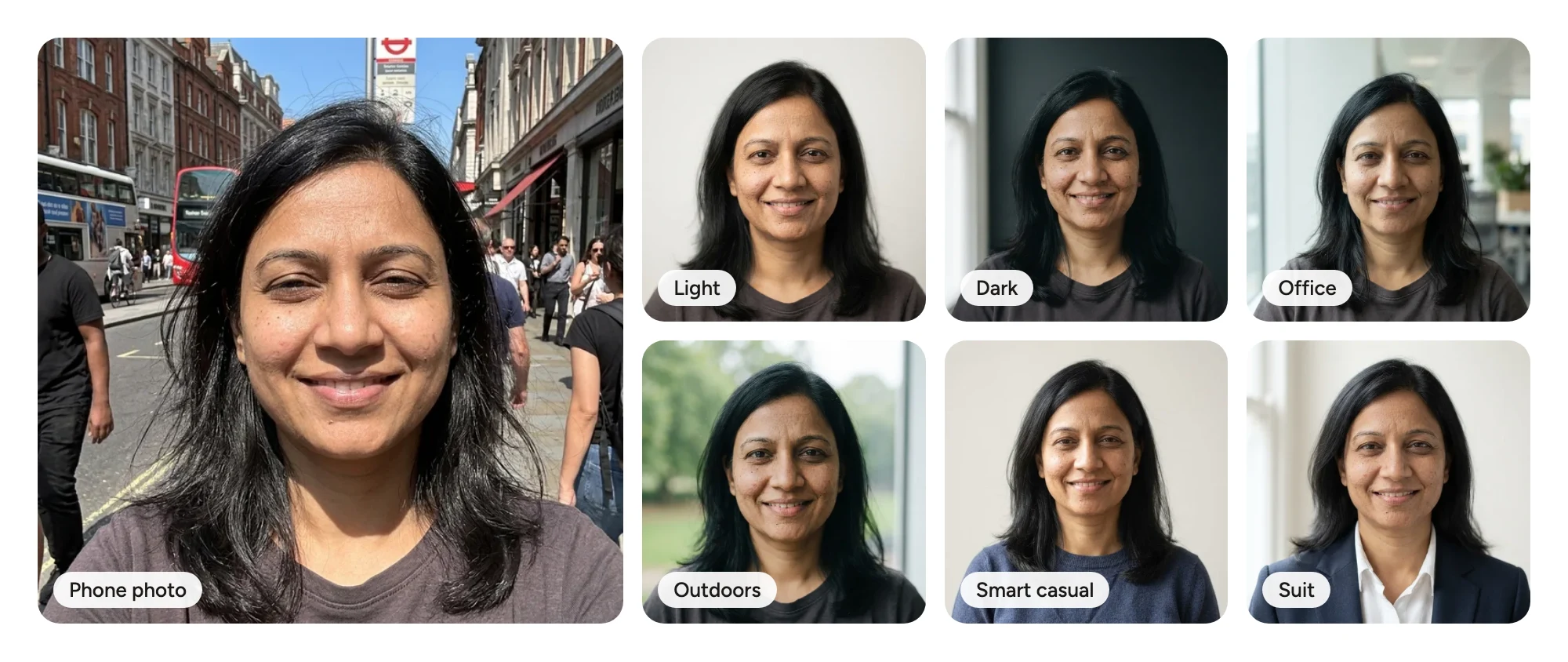
Every headshot here was made from the phone photo on the left. The person is AI-generated.
The steps above still matter if you go this route. AI works from what it's given, so a photo where you face the camera, with your eyes visible and light on your face, gives a much closer likeness than a dark, tilted selfie.
When to reshoot instead: if your field cares a lot about authentic photography (acting, modelling, some creative roles), or if the AI result doesn't look like you, take a real photo. A slightly imperfect photo of you beats a polished one of someone who looks like your cousin.
Before you upload a photo you took yourself, shrink it on screen until it's about a centimetre wide. That's roughly how big it appears next to your comments and in search results. If you can still tell it's you, it's ready.
If you went the AI route, the generator's Preview on LinkedIn button opens the free LinkedIn profile checker with the new headshot in place. Add LinkedIn's Save to PDF of your profile and you'll see the headshot next to your headline, drawn the way a recruiter sees your profile.
Yes. Any recent phone has a good enough back camera. The results depend far more on the light, the distance and the background than on the phone, so face a window, use the 2x or 3x lens, and stand well in front of a plain wall.
Only if it blurs the background cleanly. Portrait mode often leaves a smudgy edge around hair, glasses and ears. Zoom in on the result, and if the outline looks wrong, turn it off and step further away from the wall instead.
Put your phone on a shelf or a stack of books at eye level, set the self-timer to take several shots in a row, and face a window. Take dozens of frames and change your expression between them, then pick the best on a large screen.
Mid-morning or mid-afternoon, when daylight is bright but a window isn't letting in direct sun. An overcast day is even better, and night under ceiling lights is the worst option.
Ask someone if you can, or use the self-timer with the back camera. A front-camera selfie at arm's length distorts your features and often looks mirrored, which is why selfies read as selfies even when the light is good.
Every two or three years, or sooner if your appearance changes: a new haircut, new glasses, a beard you've grown or shaved. The goal is that someone recognises you at your first interview.
Pick the brightest window you have, wait for a grey morning, and give yourself twenty minutes and a hundred frames. One of them will look like you on a good day.