Turn your CV into a website
PDF or DOCX · up to 2MB
Turn the CV you already have into a personal website in minutes, no code. See 6 real examples, how it works, the themes and analytics, and how to get found on Google.
When to follow up on a job application, who to send it to, and six short email templates to copy. Timing backed by a survey of 300+ HR managers.
Whether to put a photo on your CV depends on the country. Where it is expected, where to leave it off, the usual sizes, and what makes a good one.
Your LinkedIn About holds 2,600 characters, but desktop shows about four lines before "see more". Where LinkedIn folds each section, and what to put first.
Your CV is a file.
You attach it to an application and hope someone opens it. It renders differently on every screen, it says nothing about how you actually think or what you have built, and the moment you send it, it is frozen. Spot a typo the next morning and it is too late. That version is already sitting in someone's inbox, looking slightly wrong on a monitor you will never see.
Here is the strange part. In a study commissioned by Workfolio and reported by Forbes, 56% of hiring managers said they were more impressed by a candidate's personal website than by any other branding tool. Only 7% of job seekers had one. The thing recruiters respond to most is the thing almost nobody bothers to make, because making a website used to mean a weekend with a site builder, a template that fought you, and content you had to retype from your CV.
So we removed the weekend. Personal Websites on JobSprout turns the CV you already have into a live page at your own address in minutes, with no code and nothing to retype. This post is both the announcement and the full walkthrough: what it does, what it does not do, how to make one, and six real examples you can open right now.
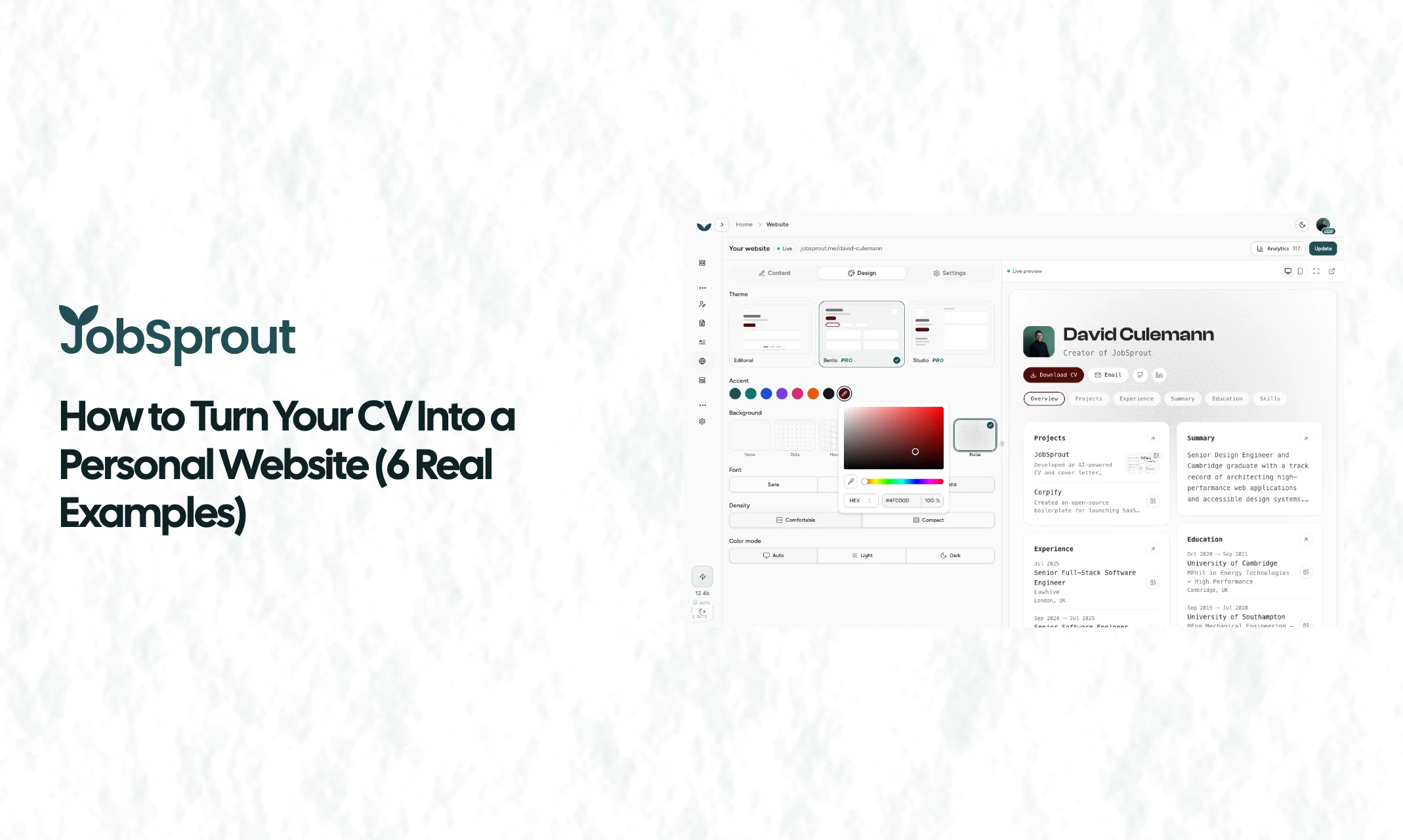
The real builder: pick a theme, recolour it, switch the background, and watch the live preview update
A personal website (you will also see it called a resume website, an online CV, or a digital CV) is a single web page that presents your experience the way a good CV would, except it is live at a link instead of trapped in an attachment. That difference is not cosmetic. It changes four things:
None of that requires you to become a web designer. It just requires the wall between "the CV I already wrote" and "a page on the internet" to come down. That wall is what we removed.
A resume website and a personal website are the same thing here. The whole flow lives in one place. Inside JobSprout, open Website in the sidebar. If you have never made a site, you land on a single screen titled "Turn your CV into a website."
1. Pick what it is built from. You do not start from a blank page. You pick a source: your JobSprout profile, or any CV you have already made. Whichever is most complete is preselected, so for most people there is nothing to change here. There is no gallery of fake sample people to wade through; the only things you choose between are your own documents.
2. Click "Create my website." That is the one click. The site is generated from your CV in a second or two. Your name, summary, experience, skills, education, projects, and any other sections you have flow straight in, in the order your CV already uses. Nothing is retyped.
3. Make it yours. The editor opens with a live preview on the right that updates as you change things on the left. Everything autosaves as you go. More on the design controls below.
4. Claim your address and publish. Hit publish and your site goes live on jobsprout.me. That is it. From a CV you already had to a live website, the active work is a few minutes of choosing a look.
One detail that matters more than it sounds: the site stays in sync with your CV. Improve the CV later and the editor quietly nudges you that the site is behind, with a one-tap "Update site" to republish the latest version. You maintain one source of truth, not two.
This is where a personal website earns its keep. LinkedIn makes everyone look identical. Here the look is yours, without touching code.
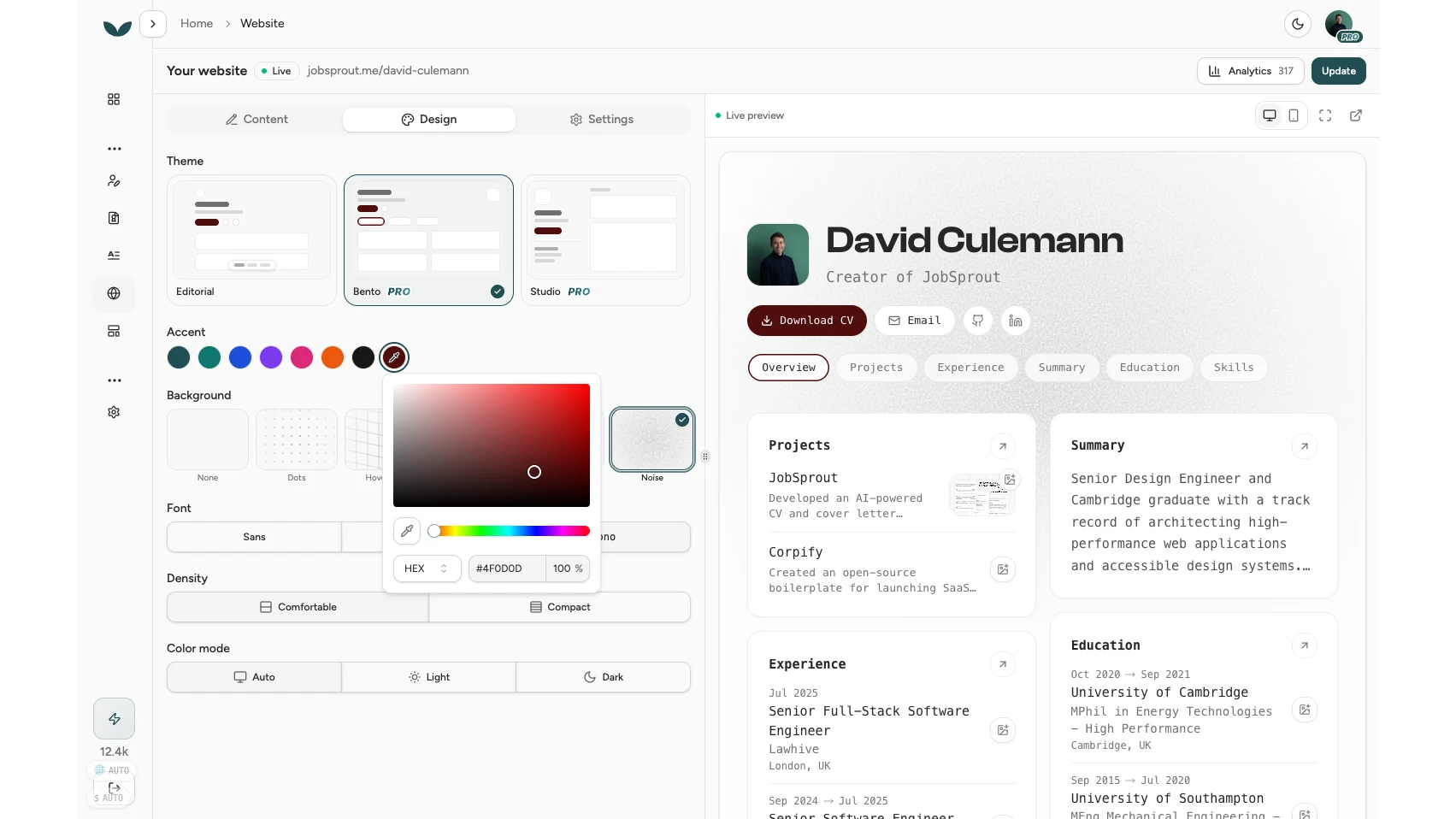
The Design tab: theme, accent, background, font, density and colour mode, with the live preview updating beside you
Themes. There are three, each a genuinely different layout, not a recoloured skin:
Bento and Studio are part of Pro. Editorial on its own is a complete, professional site, so free is not a crippled demo.
Accent colour. Seven presets from a deep teal to near-black, plus a full custom picker with a hue slider and an eyedropper if you want to match a brand colour exactly. The accent flows through buttons, links, and highlights, and the text colour on top of it is auto-adjusted so it always stays readable.
Font. Sans, Serif, or Mono. Three deliberate choices, not an overwhelming font menu.
Density. Comfortable or Compact, depending on whether you want room to breathe or more on the screen at once.
Colour mode. Light, Dark, or Auto. Auto is the clever one: it follows each visitor's own device setting, so your site looks right whether the recruiter opening it prefers light or dark.
Backgrounds. A set of subtle textures sits behind the top of the page: Dots, a hover-reactive grid, Stripes, Hexagons, a soft Noise grain, or accent-tinted Light rays, plus None if you want it clean. These are tasteful backdrops, not loud wallpaper, and they fade out as the content begins.
You can also reorder your sections by dragging them, and hide any you do not want to show, all with the live preview updating beside you. Worth being straight about the boundary: the layout comes from the theme you pick, so this is not a drag-anywhere page builder where you place blocks on a blank canvas. It is a set of strong, opinionated designs you make yours, which is exactly why the result looks considered instead of like a first attempt at web design.
A resume website only works if people find it, and the first place they look is the CV itself.
https://.If you turned search indexing off, the site still belongs on the CV. That setting only keeps the page out of Google; anyone with the link opens it normally, which is exactly what you want when the link is printed on your application.
Every section from your CV can appear: summary, experience, education, projects, skills, certifications, awards, publications, volunteering, references, languages, and any custom sections you have added. Empty fields simply do not render, so there are no awkward blank labels.
The part that turns a resume into a portfolio is rich link previews. Add a link to a project, an article, or a repo on any entry, and the site pulls in a clean preview image from that page and hosts its own copy. No hotlinking, no expiry, no tracking pixels, just a tidy thumbnail sitting next to the description. If you would rather use your own image, you can upload one per entry instead. To be precise about what this is: it is a preview image plus a clickable link, not a live embed or an iframe. It makes "I built this" into "here, look," without turning your page into a slow mess of third-party widgets.
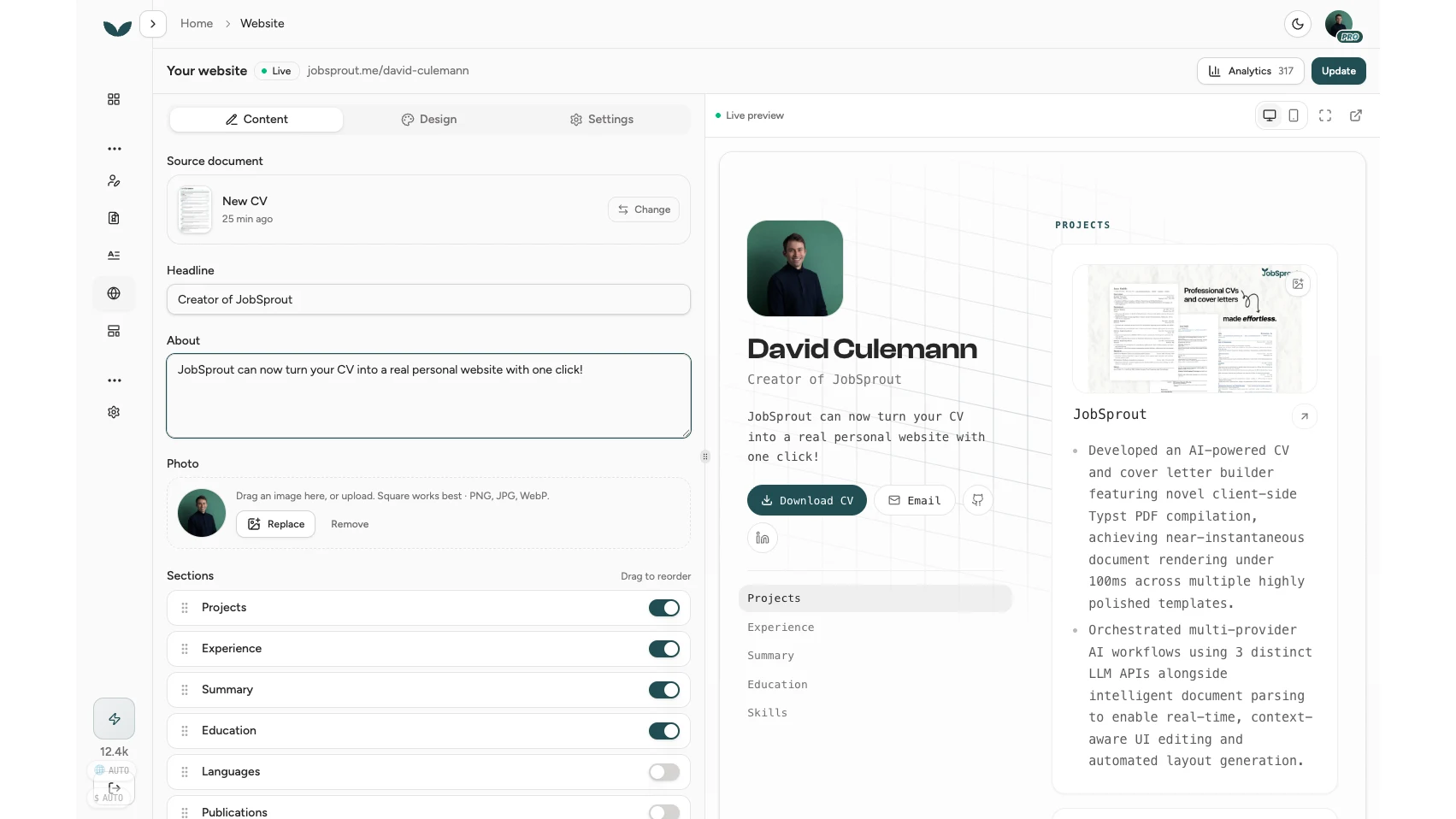
Drag to reorder sections, toggle any off, and watch projects pull in their own preview images
Your photo works the same easy way. Drop an image on the avatar field and it is cropped to a clean square automatically. Square works best, and PNG, JPG, or WebP are all fine.
A website is the front door, but recruiters still ask for the file. So every site can carry a Download CV button, and you decide whether it appears.
The download is a polished PDF generated from the same source as your site, using your CV's own template, so it reproduces your CV rather than being some watered-down export. Because it is regenerated whenever you publish, it never drifts out of sync with the page.
There is a deliberate privacy split here that is worth knowing. The public web page never shows your phone number or postal address, and it only shows your email if you switch that on. The downloadable PDF, on the other hand, contains your full contact details, which is what a recruiter needs once they have decided to reach out. The toggle even says so plainly. Public page for browsing, PDF for contacting.
This is your call, and the control is a single "Allow search engines" toggle in settings.
Turn it on and your site can surface when someone searches your name, which is a good thing to own before an interviewer runs that search for you. Turn it off and the page stays unlisted, reachable only by the link you share, which is the right setting if you are job hunting quietly while employed.
One caveat, because it protects everyone: even with indexing on, a brand-new site is not instantly crawlable. Indexing takes effect once your account is verified and a little over two days old. That short delay keeps the jobsprout.me domain clean of spam, which is what makes it worth ranking on in the first place. It costs you nothing except a small wait at the very start.
Once your site is live, a PDF attachment tells you nothing about whether anyone read it. Your site does.
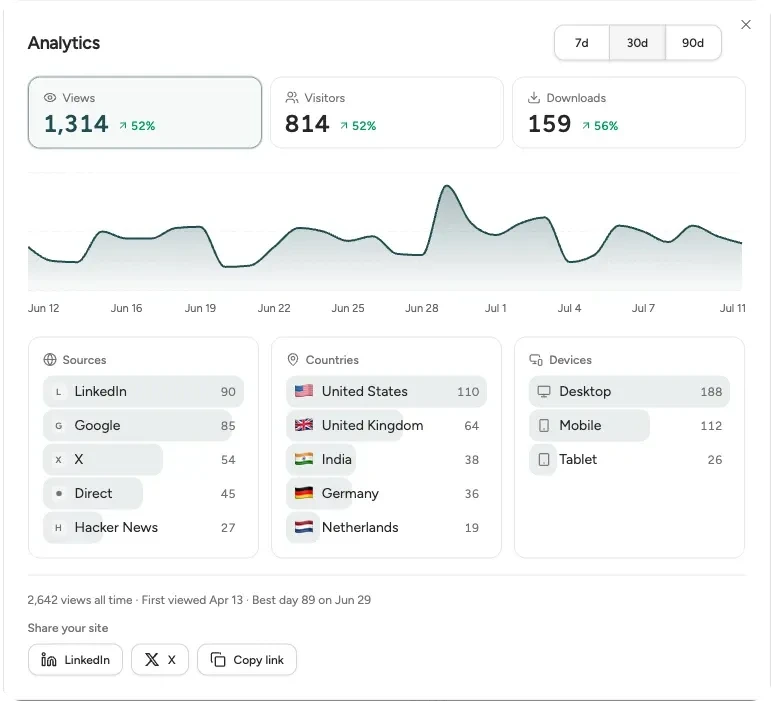
Views, visitors and downloads over time, plus where they came from, by source, country and device
The built-in analytics are first-party and privacy-conscious. Visitors are counted with a lightweight beacon, bots are filtered out, and individual people are never identified. On the free plan you see all-time views, this week's views with the change on last week, and a 30-day trend so you can tell whether the link in your signature is actually being clicked.
Pro adds the detail: unique visitors, how many people downloaded your CV, and breakdowns of where your visitors came from, which countries they are in, and what devices they used, across 7, 30, or 90 days. It is the quiet feedback loop that job hunting almost never gives you. You send something out and, for once, you can see it land.
The reason all of this compounds is that it is one link you point at from everywhere.
When you publish, JobSprout offers to add the link straight to your CV header, so every application you send afterwards carries your site with it. Put the same link in your email signature and your LinkedIn profile, and share it with a tap to LinkedIn, X, or a copied link. It is always the same clean address, and it always shows your latest work, because there is only one thing to keep updated.
The fastest way to understand this is to see some. The six sites below are real and live on jobsprout.me, each built from a CV and each dressed differently. These are not screenshots; they are the actual sites rendered right here, and every card opens the live page.
They cover very different careers on purpose, because a personal website is not only for designers and engineers. There is a senior frontend engineer whose projects carry the weight, a product designer who leads with the work, a computational biologist with publications sitting beside experience, a growth marketer with results up front, an architect whose projects read like small case studies, and a junior data analyst. Open that last one if you are early-career or a recent graduate, because a clean live page makes a short CV read as considered rather than thin.
Open a couple. Notice that they load fast, read well on a phone, and are real pages a search engine can index, not slideshows trapped behind a login. That last point is where a lot of "resume website" tools quietly fall down, and it is the whole reason to build yours somewhere that treats it as a real web page.
Publishing is free, and so is hosting. No card, no trial clock, no watermark that shames your page.
On the free plan you get a complete personal website: your content, the Editorial theme, all the design controls, the downloadable CV, indexing, and the core analytics, published at an address like jobsprout.me/cv-a1b2c3d4.
Pro adds the things worth paying for once you are serious: your name as your address (jobsprout.me/yourname instead of the generated one), the Bento and Studio themes, and the full analytics with visitor, download, and source breakdowns. You can hold exactly one site per account on either plan, which keeps your link stable and memorable rather than scattered across half-finished pages.
If you have looked at this before, you have probably weighed a few paths. Here is the shape of it.
Turning your existing CV into a site sidesteps all three. You are not designing from scratch, you are not renting a template everyone else has, and you are not writing HTML. You are giving the CV you already wrote a home on the web.
In JobSprout, open Website in the sidebar, pick the CV or profile to build from (the most complete one is preselected), and click Create my website. Your content flows in automatically, so you go straight to choosing a theme and publishing. Making the site takes minutes because you are not typing anything in again or designing from a blank page.
For most job seekers, yes. A study commissioned by Workfolio found that 56% of hiring managers were more impressed by a personal website than any other personal branding tool, while only 7% of candidates had one, so it is a cheap way to stand out. It gives a recruiter one link with your experience, your work, and a downloadable CV, and it is what shows up when someone searches your name.
LinkedIn makes everyone look the same inside one platform you do not control. A personal website is your design, your ordering, your projects with live previews, and a CV people can download without logging in to anything. Most people use both and treat the website as the link they actually share.
No. There is nothing to install and no HTML or CSS to write. You pick a theme, adjust the colour, font, and layout, reorder your sections, and publish. It is closer to editing a document than building a website.
Yes. You can build and publish your site for free, with hosting included and no card required, at a ready-made jobsprout.me address. Pro adds your name in the link, the premium themes, and the full visitor analytics.
Only if you want it to. Turn on indexing and your site can appear when someone searches your name. Leave it off and the page stays unlisted, reachable only by the link you share. Indexing takes effect once your account is verified and a little over two days old, which keeps the domain free of spam.
Yes, if you allow it. Visitors get a polished PDF that matches what they see on your live site and includes your full contact details. The public page itself keeps your phone number and address private, so you share those only through the downloadable file.
Any time. Change your CV and republish, and the site updates to match. Unpublishing takes the page down within minutes while keeping your content and address, so you can bring it back whenever you want.
Your CV took real effort. Right now it is a file that gets opened, skimmed, and forgotten. Turning it into a website costs you minutes and gives you a link you can put everywhere, that shows your work, that recruiters find when they search you, and that you never have to rebuild.
And if you want the CV underneath to be as strong as the page it lives on, read our guides on how to write a CV, ATS-friendly formatting, and what hiring managers notice in the first 7 seconds.
Built a site you are proud of? Send me the link. Email david@jobsprout.ai or connect on LinkedIn.